
To optimize Google Ads with AI, fix your conversion tracking, choose the right bidding strategy, and properly test features like AI Max. Then judge results by real business outcomes, not just Google’s conversion count.
AI now handles bidding, query matching, and even headline writing. Good Google Ads optimization means feeding it the right data and checking its work.
This guide shows how to use AI for Google Ads in eight practical steps, backed by real case studies. At JC Web Pros, we run Google Ads alongside SEO and web development, so we look at the full picture, not just the ad account.
What “AI in Google Ads” Actually Means in 2026
The term gets thrown around loosely, so here is what is actually inside your account:
- Smart Bidding: Sets bids for every auction in real time, based on your conversion goal.
- AI Max for Search: A bundle of features on top of a normal Search campaign: broader query matching, AI-written text, and final URL expansion.
- Performance Max: A campaign type that runs across Search, Shopping, YouTube, Display, and Discover/Gmail.
- Ads Advisor: An assistant inside Google Ads you can ask questions about your performance.
- Asset generation: AI-written headlines, descriptions, and images.
One thing worth clearing up: AI Max is not a new campaign type. It is a layer you switch on inside an existing Search campaign. Google Ads Help describes it as a suite of targeting and creative features.
Heads up: Google is switching AI Max on for some campaigns
According to Razor Rank’s September 2026 report, Google began automatically upgrading Search campaigns that use campaign-level Broad Match or Automatically Created Assets to AI Max on September 1, 2026, with no rollback once a campaign has migrated. Standard keyword-based Search campaigns weren’t part of that forced move. Search Engine Land’s migration timeline has the full dates. Open your campaign settings and check whether any of your campaigns were moved.
How to Use AI for Google Ads: 8 Steps
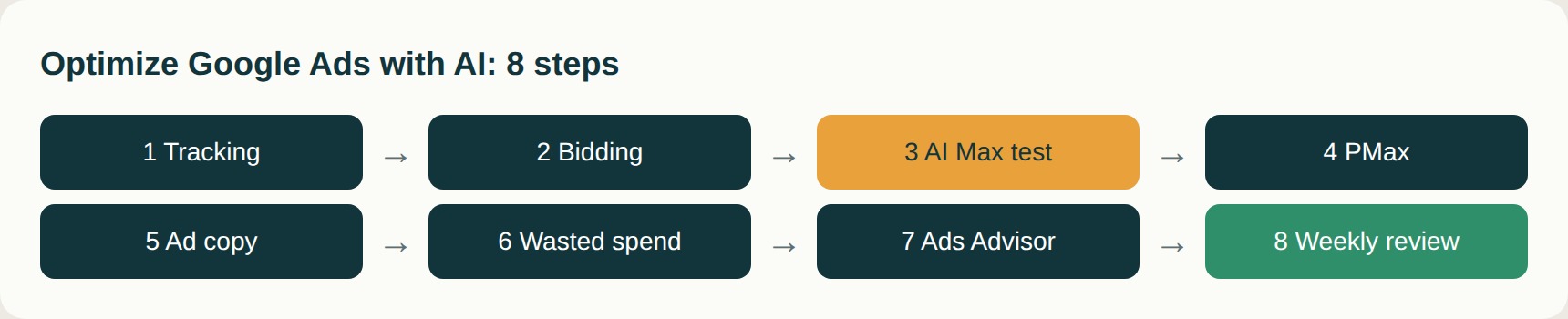
Step 1: Fix your conversion tracking before touching anything else
Every AI feature learns from conversions. If you are counting the wrong thing, the AI gets very good at finding the wrong people.
Check these first:
- Are you tracking real outcomes and not page views?
- Are duplicate conversions inflating your numbers?
- Is enhanced conversions switched on?
- If you generate leads, are you sending offline outcomes (qualified lead, closed deal) back to Google?
For lead generation, enhanced conversions for leads is worth the setup. It is the upgraded version of offline conversion import, and Google says it lets you measure offline events for up to 63 days after the click. That matters because without it, Smart Bidding treats every form fill as equally valuable, even if one in ten ever becomes a customer.
Tracking problems are one of the first things we check when reviewing a Google Ads account at JC Web Pros, because every AI feature depends on it.
Step 2: Match the bidding strategy to your goal
If your campaign is new and you have little data, start with Maximize conversions. Just set a sensible budget, because this strategy can overspend. For steady leads, Target CPA is the usual choice, but a target set too low will choke delivery. For ecommerce, or lead generation where lead values vary, Maximize conversion value or Target ROAS works better, as long as your value tracking is accurate.
A rule of thumb many practitioners use: change targets in small steps (roughly 10-15%) rather than big jumps, and don’t judge a new strategy in its first few days. Smart Bidding also needs enough data to learn from. Some practitioners suggest 30-50 conversions a month per campaign as a minimum, though that is a guideline and not an official Google requirement.
Step 3: Test AI Max properly (not on your whole account)
This is where the biggest AI Google Ads decisions are being made right now, so it deserves care.
Google’s own position is that advertisers who turn on AI Max typically see around 14% more conversions or conversion value at a similar CPA or ROAS, and a higher uplift (27%) for campaigns that rely mostly on exact and phrase match keywords.
Real-world results are less tidy. We cover case studies in detail below, but the short version is that some accounts gain and others lose money.
How to test it without risking your budget:
- Use Google Experiments, which now supports a dedicated AI Max split test with 50/50 traffic against a control. This is much cleaner than comparing before and after, because it removes seasonality.
- Open the search terms report and look at the new search term match source column. It separates queries your keywords earned from queries AI Max surfaced, so you can see what it is really adding.
- Keep your negative keyword list active. Broader matching means more irrelevant searches slip in.
- Judge it on your bottom-line metric, such as booked appointments or closed deals, not only on Google’s conversion count.
- Run the test long enough to cover your full sales cycle, not just the click-to-lead window.
AI Max is one piece of a much bigger shift. Our AI-driven digital marketing services cover how paid search, SEO, and AI search visibility fit together, because the same data often helps all three.
Step 4: Read Performance Max by channel
Performance Max used to be called a black box for good reason. That is changing. You can now see results split by Search, Shopping, Display, YouTube, and Discover/Gmail at the account level with the channel performance report, and PMax A/B testing is available too.
What to do with it:
- Open the channel breakdown and check where spend actually lands.
- Add audience signals, such as your customer lists, so the system starts closer to your real buyers.
- Change one thing at a time in experiments.
Step 5: Use AI for ad copy, then rewrite it
AI is quick at producing 15 headline options. It is also quick at producing 15 headlines that sound identical to everyone else’s.
A better workflow:
- Feed it real details: pricing, guarantees, locations, years in business.
- Ask for different angles: trust, speed, price, results.
- Edit every line by hand. Cut anything that could belong to any competitor.
- Replace weak assets every four to six weeks.
Step 6: Use AI to find wasted spend
This is the most underrated use of AI in Google Ads. Export your search terms report (remove any personal data first) and ask an AI tool to sort it.
Two prompts to try:
“Group these search terms by intent: ready to buy, researching, and irrelevant. Suggest negative keywords for the irrelevant group and explain each one.”
“List terms that spent over amount with zero conversions. For each, tell me whether it needs a negative keyword or a better landing page.”
Always review before adding negatives. AI will occasionally flag a term that converts under a different name.
Step 7: Use Ads Advisor for quick audits

Instead of pasting data into another tool, ask Ads Advisor directly inside Google Ads. Useful questions:
- Why did my cost per lead rise last week?
- Which campaigns are limited by budget?
- What changed in conversion rate over the last 30 days?
Treat every answer as a lead to investigate, then confirm it in your reports.
Step 8: Set guardrails and review weekly
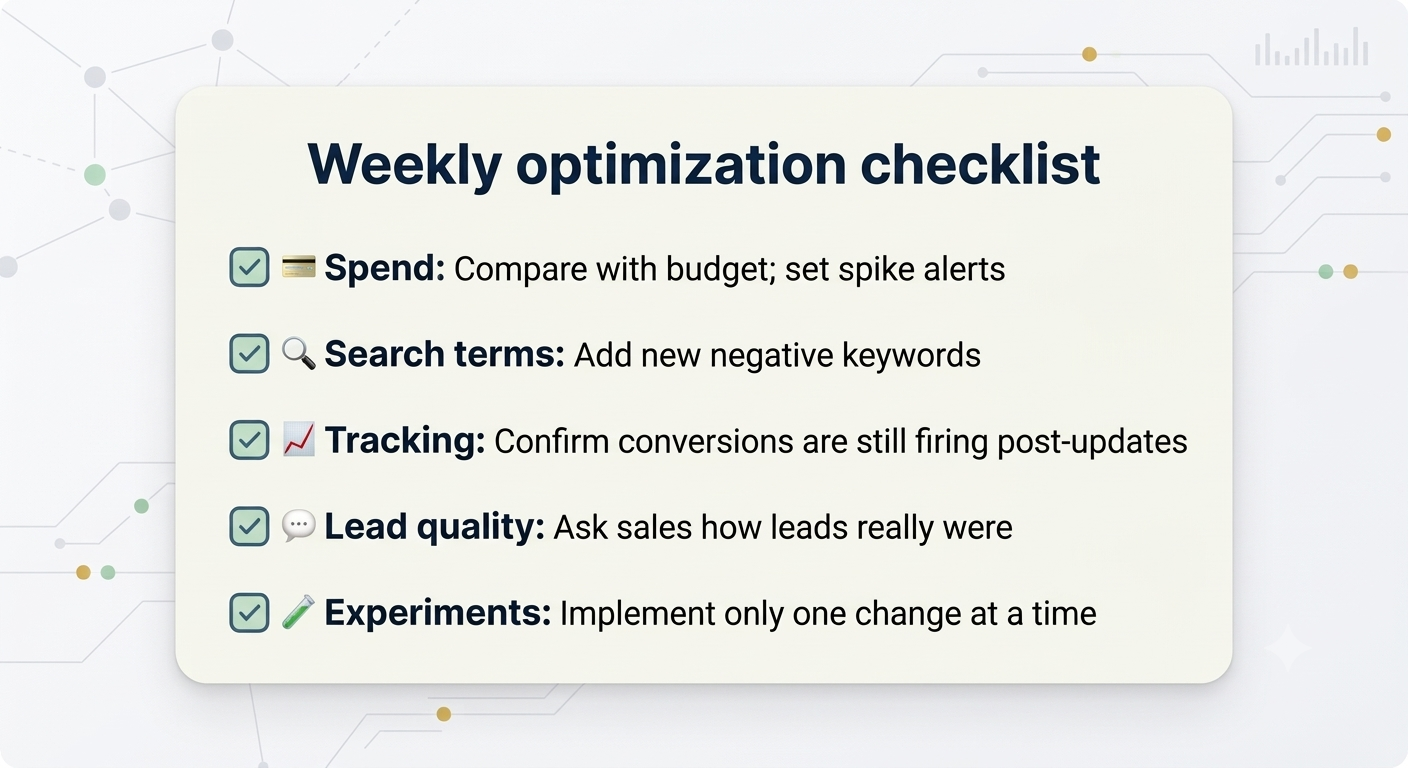
AI moves fast, and so do its mistakes. A simple weekly routine:
- Spend
- Search terms
- Tracking
- Lead quality
- Experiments
What the Case Studies Actually Show
Here is where it gets interesting. Same feature, very different outcomes.
The best-case results (Google’s own showcase):
- Think with Google reports that ClickUp saw a 20% lift in incremental conversions and a 22% lower CPA after adding AI Max, and that Royal Canin saw conversions jump 263% with CPA down 73% in a structured A/B experiment.
- On Google’s own blog, L’Oréal reported double the conversion rate at 31% lower cost per conversion, and MyConnect reported 16% more leads at a 13% lower cost per action: Google’s AI Max announcement.
The more mixed results (independent testers):
- Location3 ran a controlled AI Max test across five local markets for a home services franchise between December 2025 and January 2026, and found it surfaced conversions from longer, problem-based queries that keyword lists miss.
- Search Engine Land’s early case study roundup found AI Max helped a fashion ecommerce account capture new long-tail queries, but made little difference in a travel account and struggled in a B2B SaaS one.
- Razor Rank pooled several accounts and found conversions rose 28% while signed cases fell 40%, and cost per signed case rose 135%. One account switched AI Max off because of it. They are clear that it is a small sample and not a verdict on the feature.
The lesson: AI Max can bring in more conversions without bringing in more customers. If you only watch Google’s conversion count, you can miss that. This is the reason Step 1 (tracking real outcomes) comes first.
6 Mistakes That Waste Budget
- Turning on automation before fixing conversion tracking
- Changing bids, budgets, and ad copy in the same week
- Publishing AI-written ads without editing them
- Ignoring the search terms report after enabling broader matching
- Optimizing for cheap leads instead of qualified ones
- Pasting customer data into public AI tools


Share This Post :